Your idea.
Your world. Your film.
Prepare your images. Direct your shots.
Build your video with AI.

From idea
to cinematic.
VIDEO CREATION WITH AI
Prepare your images. Direct your shots.
Build your video with AI.

VIDEO CREATION WITH AI
Framing, movement, rhythm: see how those choices come to life.
Example of my work. Your results depend on your choices, tools and practice.
Face, outfit, silhouette: prepare your reference before animating.

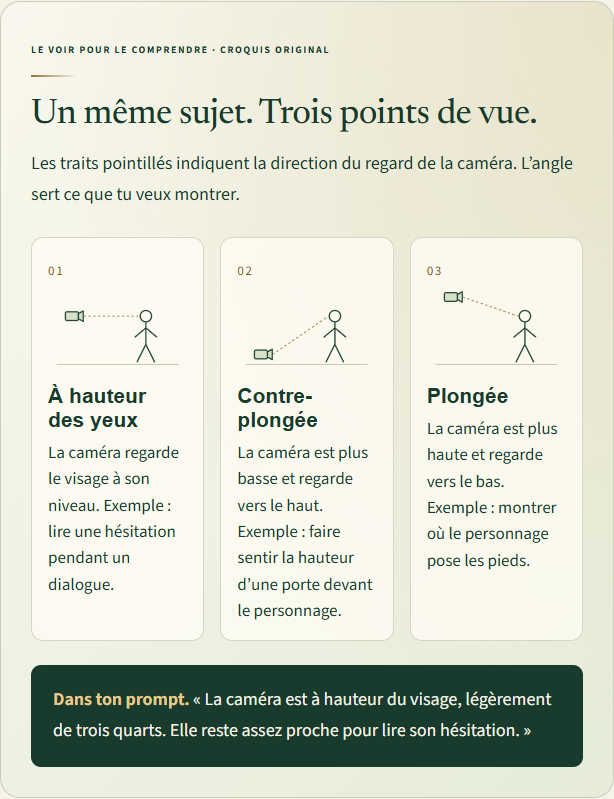
Sketches showing what framing changes.

Choose what the viewer should see and feel.
A page from the main guide.
A thread from preparation to editing.
Characters and references
Environment and viewpoint
Shots, rhythm and soundBetween images and editing: generate movement with AI, compare tests and select your shots.
Observe colour and contrast in the same image.


DaVinci example. Software and plugins not included. One pack of your choice free with the guide during launch.
Digital guide · No physical book shipped.
ZENX — FROM IDEA TO CINEMATIC
Go from an idea to an edited video. Prepare your characters, direct your shots and work on rhythm using the method behind my creations.
From 25 October at 18:30 to 1 November 2026 at 23:59 · Paris time.
Digital guides in English. No physical product.
Software, plugins, subscriptions and generation credits not included.
Examples, screenshots and explanations.
Creation uses AI tools and editing software. Each pack lists its software and dependencies. See the prerequisites.
Choose the pack matching your software: DaVinci Resolve or After Effects. You do not need both to follow the main guide.
Each pack costs €24.99. Both cost €49.98 when purchased separately.
Prepared references. Several tests. Selected shots, then editing. AI produces the images; my choices build the scene.
PREPARE
1The story and references
GENERATE
2Images and shots with AI
EDIT
3Rhythm, music and sound
FINISH
4Colour, sharpness and export
These examples show my work. Your results also depend on your choices, tools and practice.
Work in order, with examples to understand the choices to make.

Define a scene, character and location. Prepare references before starting generations.

Build images, formulate requests and compare tests. Keep shots that serve your intention.

Choose cuts. Work on music and sounds. Adjust rhythm to guide the viewer.
Before
AfterThe main guide establishes the workflow. DaVinci and After Effects packs detail finishing with Topaz and HandBrake steps.
A beginner? Start with the complete guide. Already have videos? Choose the pack matching your software.
From 25 October at 18:30 to 1 November 2026 at 23:59 · Paris time
Packs remain available separately for €24.99 each, or €49.98 for both. Software, plugins, subscriptions and generation credits not included.
A complete workflow to get started. Two finishing packs depending on your software.
| Contents | Main guide | DaVinci + Topaz | After Effects + Topaz | |
|---|---|---|---|---|
| Who is it for? | You want to build your video | You edit in DaVinci | You use After Effects | |
| Preparation and staging | ✓ | ✕ | ✕ | |
| Image and video generation with AI | ✓ | ✕ | ✕ | |
| Preset ready to import | Worksheets and method | .drx + LUT | .ffx | |
| Topaz steps and HandBrake preset | In the companion pack | ✓ | ✓ | |
| Format | PDF guide | PDF + files | PDF + files | |
| Price | 49,99 € | 24,99 € | 24,99 € | |
| Launch offer | 1 free pack of your choice | Free with the guide if selected | Free with the guide if selected | |
| Software and credits included | ✕ | ✕ | ✕ |
FROM IDEA TO CINEMATIC
You do not need drawing skills to start. You need an idea, tools and a method to move forward. I show you the steps with AI.
ZENX — From Idea to Cinematic
Main guide in English · One finishing pack of your choice free during launch
You can start without knowing how to draw.
AI helps create images. Framing, rhythm and editing are learned through practice. My first video lasted thirty seconds and took two days. Start short, test, then improve.
The main guide explains the workflow from preparation to editing. DaVinci and After Effects packs help finish existing videos.
Images and videos are generated with AI. You prepare references, direct tests and choose shots. Editing and finishing then happen in suitable software.
I share my method and examples. Results also depend on your choices, tools, tests and practice. No preset builds a video for you.
When buying the main guide from 25 October 2026 at 18:30 to 1 November 2026 at 23:59, Paris time, choose one free pack: DaVinci + Topaz or After Effects + Topaz. One pack only is free. Packs bought separately cost €24.99 each.
PDF guides in English. Companion packs also include preset files. This is not a video course or physical product. Exact contents are shown on the “What you receive” page.
No. Subscriptions, software licences, paid plugins and generation credits are separate expenses. Budget varies with tools, video length and number of tests.
DaVinci + Topaz uses Resolve, a LUT, Topaz and HandBrake. Full compatibility with free Resolve remains to be checked. After Effects + Topaz also requires BCC Unsharp Mask and Magic Bullet Looks. Topaz screenshots show an older interface.
No. The guide is designed for your own characters and stories. Personal adaptations in my portfolio are not part of the content sold.
Email info@zenx-klaim.com with the guide, software and version. Add a screenshot of the problem if needed.